 OpenWiring
#10. PLC
OpenWiring keeps the electrical schematic and the PLC I/O assignment together: every input and output drawn takes a channel and an address, appears in the I/O list and in the card overview, and is exported to TIA Portal, CODESYS or PLCopen.
#The PLC view
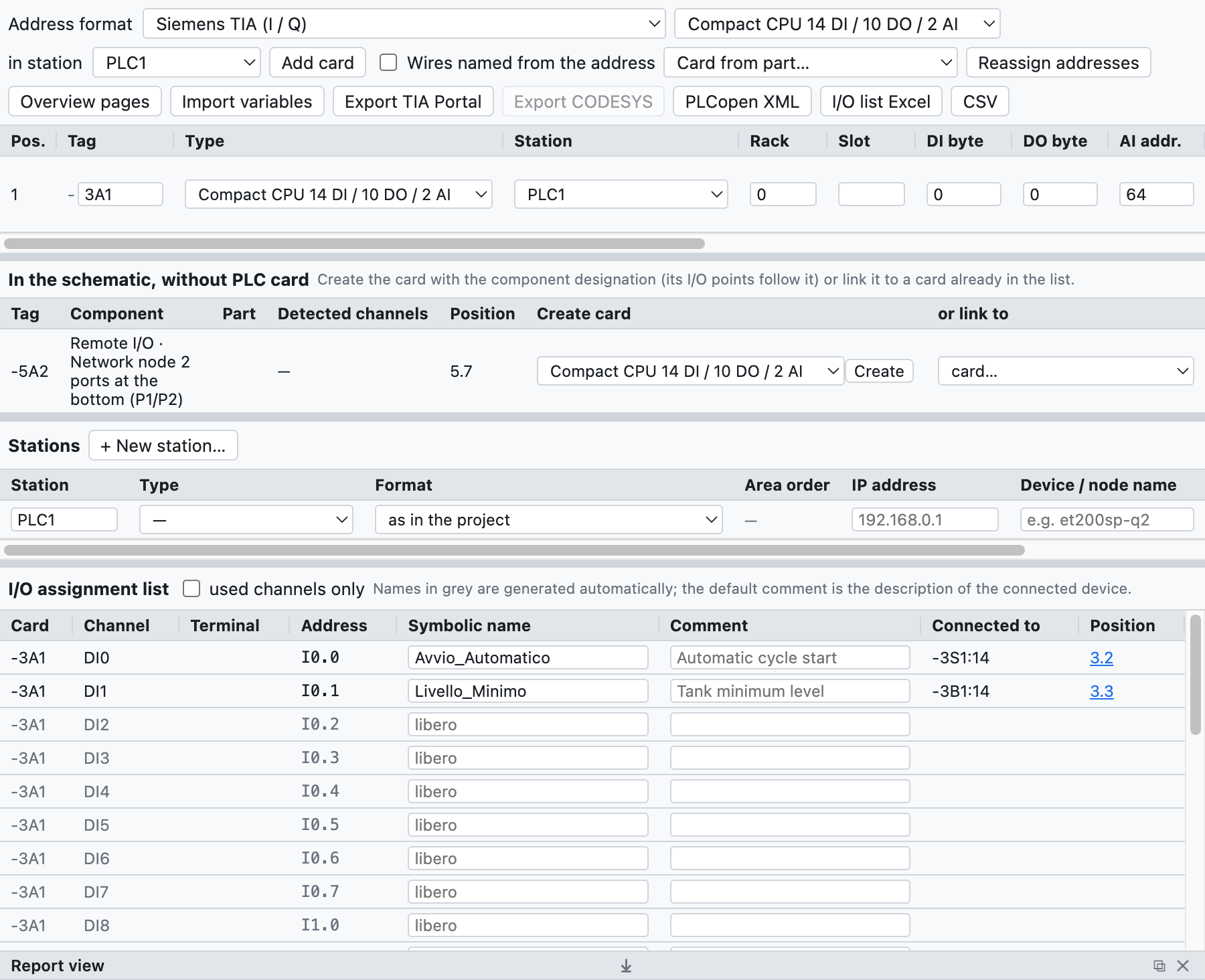
The PLC view of the example project: CPU -3A1, station PLC1 and the I/O assignment list.
The PLC tab at the top right contains:
- the bar with address format, type of card to add and export;
- the list of cards with tag, type, station, rack, slot and start addresses;
- the list of stations with type, IP address and device name;
- the I/O assignment list.
#Cards
Add card adds the type chosen in the list:
- compact CPUs 14 DI / 10 DO / 2 AI and 8 DI / 6 DO;
- digital modules 8 DI, 16 DI, 8 DO, 16 DO, 8 DI / 8 DO;
- analog modules 4 AI, 8 AI, 2 AO, 4 AO;
- IO-Link masters with 4 or 8 ports.
For each card you give tag (-3A1), station (PLC1: addresses are assigned per station), rack, slot
(assigned automatically), start addresses, description and order number. The card goes into the bill of
materials.
Card from part… creates a card from a part of the library, for example an I/O module imported from an EDZ: the number of channels is taken from the function template and can be corrected before creating the card. The connection points of the part become the terminals of the channels.
Stable addresses: a new card takes the first free addresses of its station, those of the existing cards do not change. Reassign addresses recalculates them in the order of the list (arrows ↑ ↓).
#Stations
Each station has a type (local CPU, Profinet, EtherCAT, Profibus DP, EtherNet/IP, Modbus TCP), an IP address and a device name. The check reports duplicate slots and repeated IPs and names.
#Format and area order per station
In the Stations table each station has two extra columns:
- Format: a station can use a format different from the one at the top, for example a CODESYS node next to a Siemens CPU. The format at the top applies to stations without their own format. Changing the format of a station reassigns only its addresses.
- Area order (IEC and TwinCAT formats, where digital and analog share the same area): cards in a row (default) or analogs first (WAGO), as WAGO nodes and other CODESYS couplers do. Adding a card to an "analogs first" station reassigns the addresses automatically.
TwinCAT (Beckhoff). With the TwinCAT format the addresses are %I* and %Q*: TwinCAT links them. In
the exported GVL the variables have AT %I* / AT %Q*; wires connected to a channel take their name from
card and channel (400A1.DI3), because %I* is the same for all.
Exports work per station: Export TIA Portal takes only Siemens stations, Export CODESYS the IEC and TwinCAT ones.
#IO-Link
For each port of an IO-Link master you give device, description and process data bytes; the program
calculates the addresses (IB4…IB5, %IB4, EB4).
#I/O points in the schematic
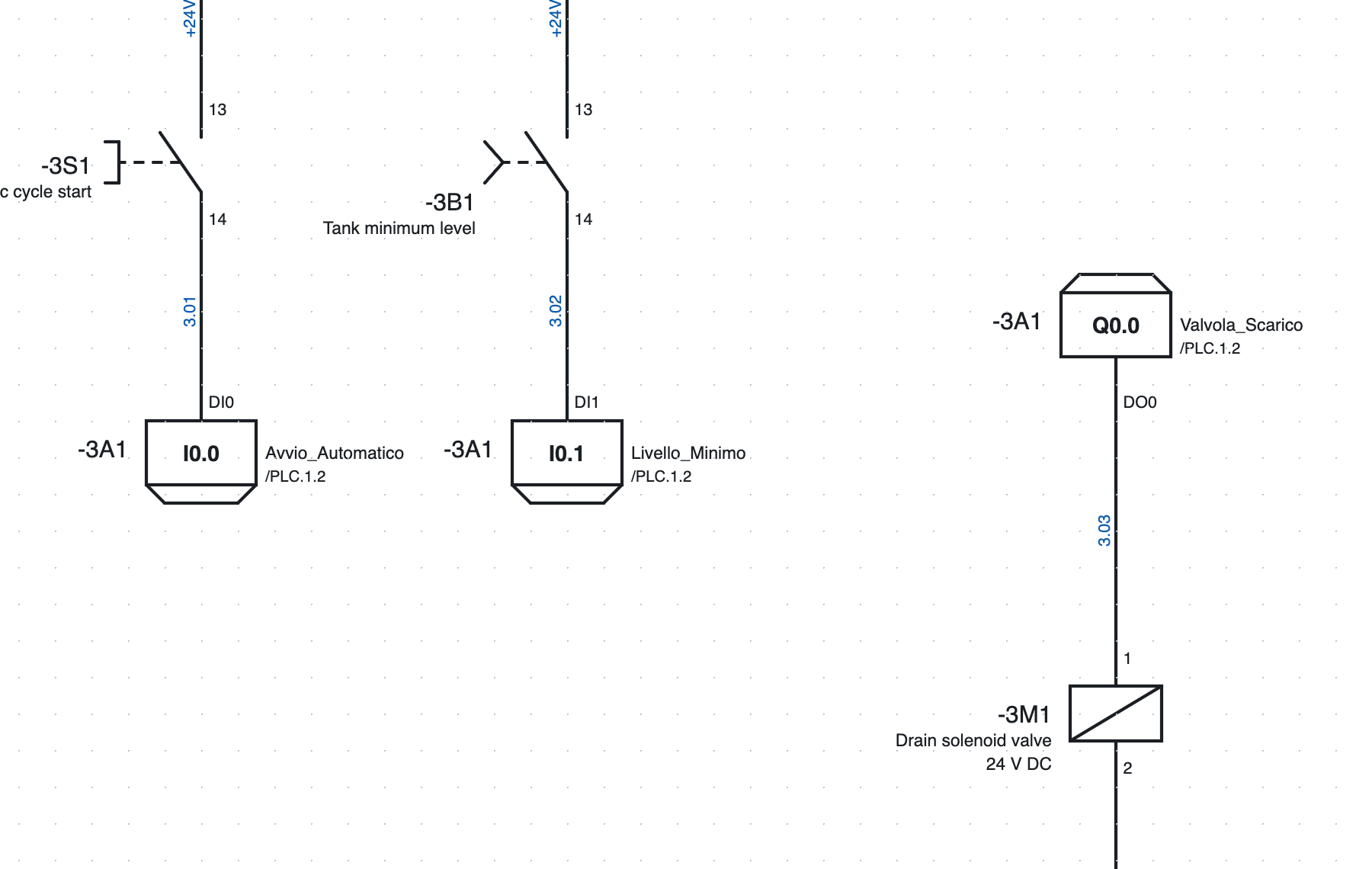
Two inputs and one output on page 3: in the box the address, on the right the symbolic name and the
reference to overview /4.2, on the left the card tag.
- In the library, category PLC, choose input or output, digital or analog.
- Insert it in the schematic and connect it to the device (pushbutton, sensor, solenoid valve…).
- The point automatically takes the first free channel of the right type; if no card has one, the program creates a new card (the first is a compact CPU).
In the point properties you change card, channel (those in use are marked), symbolic name and
comment. The terminal carries the channel name (DI0, DO3).
The L+ / M supply of the card is a separate symbol with the card tag: it is drawn on the supply circuit and its position appears in the overview.
#Addresses
The format is chosen at the top of the PLC view:
| Format | Digital input | Digital output | Analog input | Analog output |
|---|---|---|---|---|
| Siemens TIA | I0.0 |
Q0.0 |
IW64 |
QW64 |
| Siemens German | E0.0 |
A0.0 |
EW64 |
AW64 |
| IEC 61131 / CODESYS | %IX0.0 |
%QX0.0 |
%IW0 |
%QW0 |
| Omron CJ/CP | 0.00 |
100.00 |
2000 |
2100 |
| Beckhoff TwinCAT | %I* |
%Q* |
%I* |
%Q* |
Analog addresses start from 64 in the Siemens formats and from 0 in IEC; changing format adapts them. Omron uses 16-bit words, so switching from or to Omron reassigns the addresses.
#Overview pages
Overview pages creates one page per card, at the end of the project, and removes those of deleted cards.
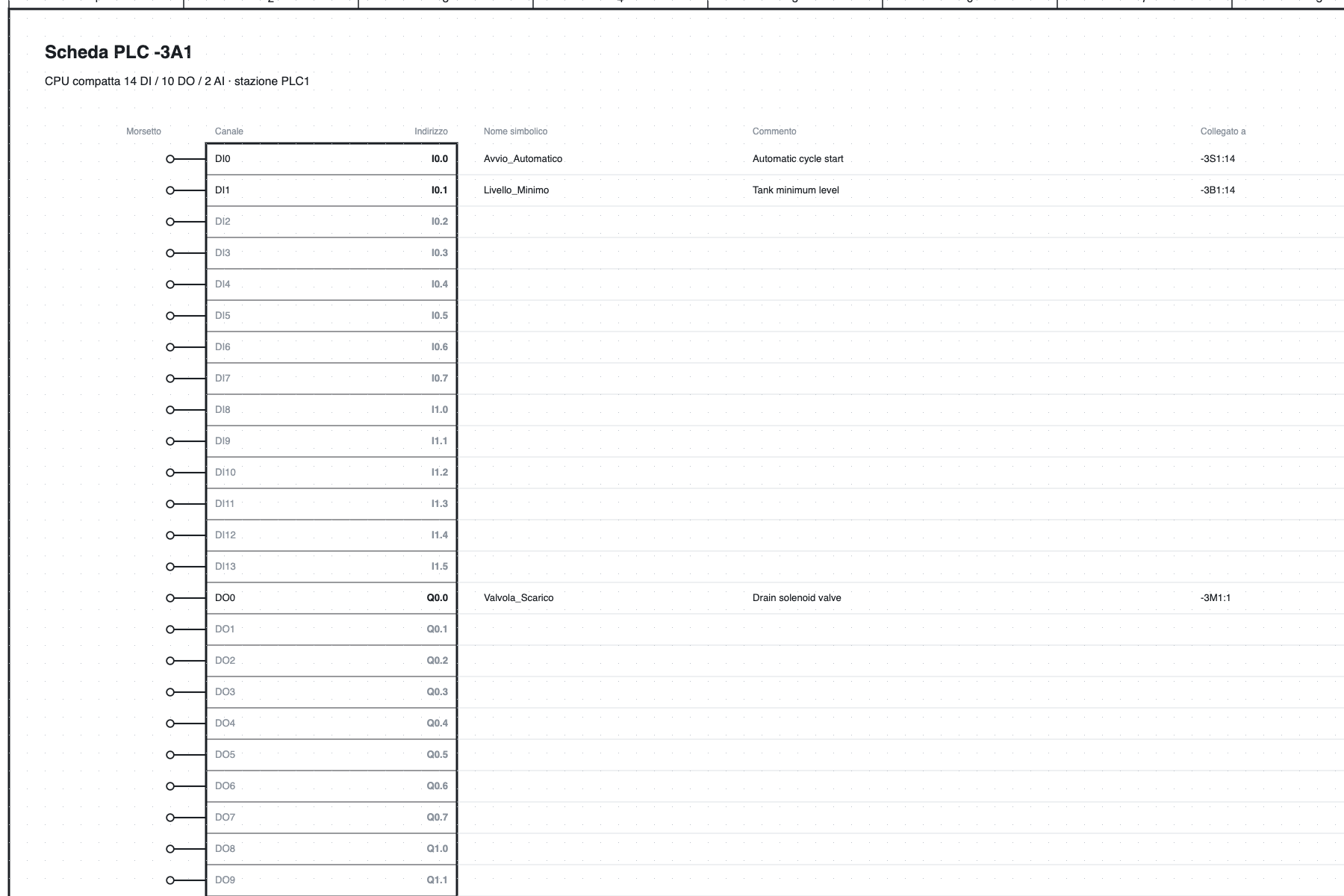
The overview of CPU -3A1: for each channel terminal, address, symbolic name, comment, connected device
and page.
The overview is always in line with the schematic, it does not need to be regenerated when you change
something. Every I/O point of the schematic refers to its row of the overview (/4.2) and vice versa.
#I/O assignment list
The list contains all the channels of all the cards, used or free, with address, symbolic name, comment,
connected device (-3S1:14, derived from the wires) and position.
- Name and comment are edited directly in the table.
- If the name is missing it is generated (
DI2_3A1); the default comment is the description of the connected device. - used channels only hides the free ones.
- The list also appears in the Lists tab and in the PDF.
- The check reports channels used twice, duplicate names, points without a card or with a channel of the wrong type.
#Exchange with the PLC software
#Export
| Button | File | Use |
|---|---|---|
| Export TIA Portal | Excel with the PLC Tags sheet |
in TIA: PLC tags ▸ Import; the tags end up in the OpenWiring table (Siemens formats) |
| Export CODESYS | text VAR_GLOBAL … END_VAR |
to paste into a global variable list (IEC format) |
| PLCopen XML | XML TC6 | global variables with IEC address, including IO-Link data; for CODESYS and compatible environments |
| I/O list Excel, CSV | table | documentation |
Example of a CODESYS line: Avvio_Automatico AT %IX0.0 : BOOL; (* Avvio ciclo automatico - -3S1:14 *).
The TIA Portal export follows the format of the TIA tag table but has not yet been tested on a real installation: if the import reports errors, export an empty table from TIA and compare the columns.
#Importing variables
Import variables reads names and comments from the PLC software and brings them into the schematic:
- TIA Portal: the Excel file from PLC tags ▸ Export;
- CODESYS: a GVL (
Nome AT %IX0.0 : BOOL; (* commento *)); - CSV with the columns Name, Address, Comment.
Matching is by address (%E0.0 and I0.0 are equivalent). Channels already drawn receive name and
comment; those not yet drawn keep them on the card and show them as soon as they are drawn. Variables
without a channel are listed in the report view.
Edit this page on GitHub · OpenWiring 2.0.6 · GPL-3.0